Archive for the ‘Technology’ Category
On SSL/TLS and HTTPS — Briefings for my Computer Security class
Brief: This is a technical briefing I made for fellow students in a Computer Security class (Winter 2011) about Secure Socket Layer [SSL] (now Transport Layer Security [TLS]). These briefings fit in nicely since it came after Dr. Obimbo explained the number theory behind RSA (modulus prime exponentiation). I went to the primary source on this topic to write this document: thanks to the Internet Engineering Task Force. I’ve posted this document as a consumable reference for anyone who needs it.
>>> Download: A Network Security Spotlight on SSL/TLS and HTTPS (pdf) <<<
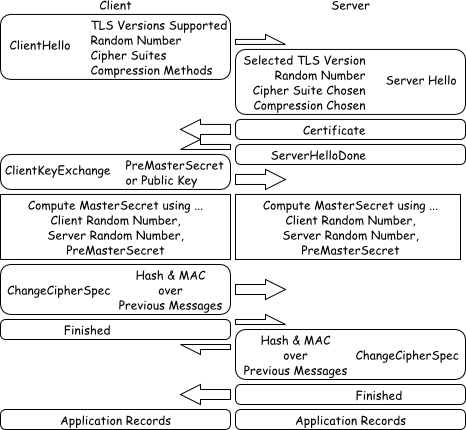
Figure $_: A Schematic of the SSL/TLS Handshaking Procedure.
This document is licensed under Creative Commons Attribution 3.0 Unported. The enclosed figures are further released into the public domain.
Phew! Sun Virtualbox Port Forwarding (on NAT) Solution
I finally found a solution for the port forwarding issue I was having with Sun VirtualBox (i.e. NAT provided a weird one-way mapping from which Tin (host) couldn’t dial into TinUbuntu (guest)…) — as far as I understand, this solution is guest operating system neutral but must be configured for each guest handled by a particular installation of Sun VirtualBox. That means that if you’re crazy like me and plan to put your virtual harddrives on USB sticks, you’d probably do just as well to put in a makefile that will do your configurations for you too. So here’s the solution, also saved in my wiki for extra truthiness!
Thanks to Evan and his “justwerks software” blog.
The following commands were issued…
cd /Applications/VirtualBox.app/Contents/MacOS $VBoxManage setextradata "TinUbuntu"\ "VBoxInternal/Devices/pcnet/0/LUN#0/Config/guesthttp/Protocol" TCP $VBoxManage setextradata "TinUbuntu"\ "VBoxInternal/Devices/pcnet/0/LUN#0/Config/guesthttp/GuestPort" 22 $VBoxManage setextradata "TinUbuntu"\ "VBoxInternal/Devices/pcnet/0/LUN#0/Config/guesthttp/HostPort" 2222
Which causes TinUbuntu TCP:22 to be forwarded to Tin TCP:2222.
In future, I should remove these rules and re-add them replacing “guesthttp” with my own name for this rule– In his blog, Evan has used a series of names: “guesthttp”, “guestssh” and “guestsql”– In reality, these are actually very good, unambiguous names that I’ll probably end up borrowing.
The one thing I should really dig around for is the meaning of “LUN#0″– it looks like something that’s important– the remaining virtual-directory-like objects in the configuration string look less daunting– “pcnet/0″ is likely referring to the first virtual network adaptor connected to TinUbuntu.
Removable storage as software modules
Brief: I had this idea a long time ago and didn’t bother to implement it. What if I placed logical volumes of data each on their own USB key? Examples… I would place the htdocs root for an apache installation on a USB stick, so that migration of this logical tree from one host to another would just involve pulling the stick and putting it in another machine. Same could be done for our giant binary SQL databases, SVN repositories, virtual machine disk images etc..
I can one up you: why don’t you put the software that runs it on the USB key as well? That way, it becomes more self-contained.
We actually did something like this at Environment Canada. Well, we started to, anyway. We have a Storage Area Network (SAN). So, we create volumes on various harddisk and then can present them to machines via a fibre network. The idea was to create volumes that represented applications and their data. Applications would be made not to litter their data on the system, so it would be easy to move an application from system to another. It also meant that the disk on machine X wouldn’t get full because of application Y. Application Y filled application Y’s disk.
The only impracticality of this system is the heterogeneity of the hosts you are using. As they become more heterogenous, it becomes more difficult to shuttle your data between them. If they are all roughly the same and upgraded in sync, it’s not so bad. Oracle, being a picky bitch of a piece of software, made the upgrading in sync difficult at EC.
That’s great… actually, I _meant_ to go in that direction in my post, as evidenced by the title– but I ended up going a different way because I didn’t have good examples.
I would do this, but I don’t really have too much software that would benefit from that. Wait a second… all this new command line bioinformatics stuff and associated data… that would be an excellent candidate. We should sit down and chat about protein folding some time…
Sun Virtualbox VM * Ubuntu: Good for us.
Brief: Sun Virtualbox VM with Ubuntu (or really, any agreed-upon free Linux) is an excellent way to create a consistent environment between collaborators. Everyone knows the headaches of transitioning code from Windows and Mac– let’s just transition out of the transitional mindset altogether… Anyway, I mention these two products because it helped Chris and me a lot.


Sun Virtualbox VM (a free version exists! … as in beer.)
Ubuntu (still free, as in a bird– and as in beer.)
I use the same thing for running my network simulations now inside of ubuntu (I got too lazy to do a dual boot setup and just run the vm inside windows now) I definitely <3 the sun virtual box. Its also good for testing hobby OS stuff inside of without rebooting the computer each time if you are interested at all in that type of thing.
Ya… As great as it is– I managed to keep finding defects– none of them are life ruining.
The most annoying of which only happens on a Mac– in a few of the dialogue windows where one adjusts settings, configurations etc., the software always draws the window so that the title bar is above the vertical limits of the screen making some of the controls unreachable — I finally figured out that I could grab onto a few empty pixels and drag the thing down, but those empty pixels aren’t supposed to work that way either.
ANYWAY– If this happened in Windows, I’d probably use alt+space and navigate down to “move window” with my arrow keys which is actually an elegant solution (to a problem that should not exist). In Mac, the philosophy of having a single shared application menubar rendered as an OS visual element means that there’s no logical way to give each window its own menu item that has a “move window” command. Oops!
So I gather– the most meaningful conclusion is that such a flaw shouldn’t exist in any software for any OS… I figure they’ll fix it eventually.
Zinc, the Entertainment Unit

Firefox Eats Cara's TV
Way back at the beginning of this month, I sent away to Apple to order a DVI-I to S-Video / RCA connector. The total cost was $35 after shipping and tax, so it was well worth it as now I’ve gotten yet more value out of the Mac Mini.
The circa 1980′s television set can now play all of the media that is on the network, on the internet or on whatever other storage you can plug into Zinc, the Mac Mini.

DVI-I to S-Video and RCA
Technical Stuff about DVI Connectors
When looking for a DVI to RCA video connector, the wrong thing to do is to go to a big computer shop. These places will turn you away and tell you the part doesn’t exist. Heck, even the hobby shops failed to provide it or give any useful information. And you know– they’re half right. There’s no such thing as a DVI-D to RCA connector, because the former is a digital signal, and the latter is an analogue signal. The DVI-I is port is offers a combined digital and analogue signal, that’s how it can be converted out to such a large variety of display devices. It’s one of the selling points that Apple discusses about its laptops and other machines.
Buy it or not…
If you purchased a computer with a DVI-D output, you won’t be able to use Apple’s connector– so don’t try, you’ll waste your money and be frustrated– however, if you have a machine with DVI-I output, then this thing will work for you too even though big and small shops alike will tell you the connector doesn’t exist.

Simply Charming
I also got two charming flotation device / pillow / toys packaged with the connector!
Conclusion: I’m happy
I like the firefox on tv. Also the flotation pillow toy.
Yes, I also like these things… I likes thems alots… I probably could have taken a more informative photo instead of Firefox, but I’m tired now.
Bah! Everything up in the post that says “RFA” should be “RCA”.
Monet Molecules c/o Autotrace

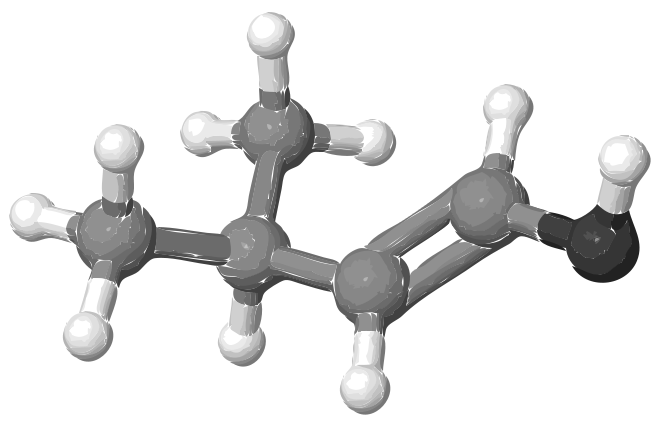
A Monet Isopentenol c/o Autotrace
Brief: Happy accidents make me happy– here’s isopentenol after grabbing it as an SDF out of PubChem, dumping it out into a PNG with Bioclipse, grayscaling it with GIMP– then converting it to an SVG with Autotrace (RO IT Systems)… It’s just pretty… like a Monet. Of course, I have to go back and make it look like a molecule again for a paper… but I’m going to admire the pretty little alcohol for a bit.
Ooh, this is giving me ideas for a new approach to a paint shader. Thanks for the inspiration!
Ed's Big Plans
Comic Sans? Really?
Yes. It was a dare. I won.